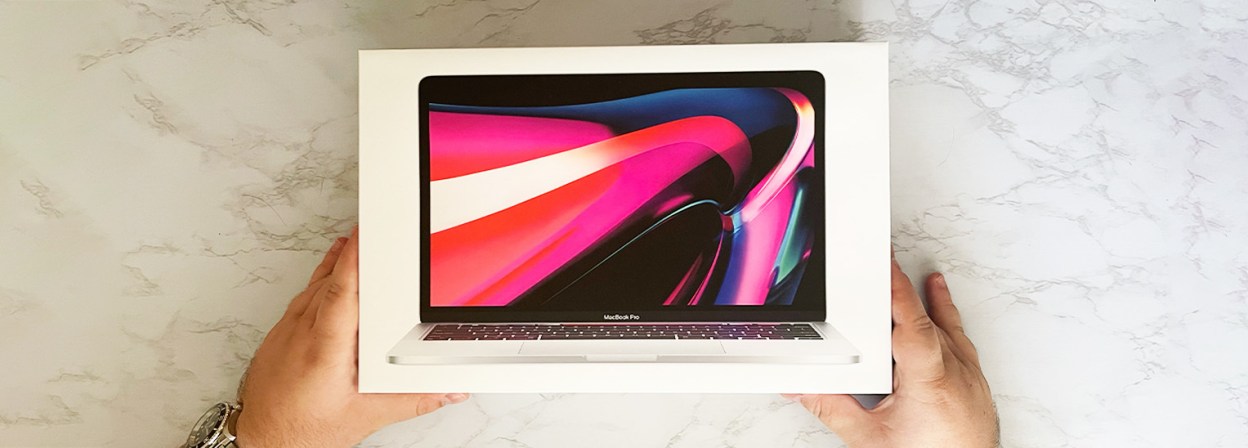
Buying guide for best Macbooks
Ready to buy now? Shop the best: I've been using MacBooks for years, and the honest truth is that there's never been a bad one, just ones that fit your life and needs better than others. The lineup has gotten more complicated, though, and picking the right one takes a bit more thought than it used to.
What they all have in common is this: slim aluminum builds with sharp displays that allow you to enter a highly coveted club, the Apple ecosystem. Whether you're a student, a creative professional or just someone who wants a reliable laptop, there's a MacBook for you.
After spending time with the current lineup, the 2026 MacBook Air 15-inch with M5 is probably the right call for most people. If you want the most value for the money though, and one of Apple's most recent products, the MacBook Neo, at $599, is an incredible value. And if you're a serious creative professional who needs all the power you can get, the MacBook Pro line is always available.
Expert TIp
AppleCare+ is worth the cost. Apple’s laptops are well made and generally not prone to breaking down, but accidents happen — and AppleCare+ is one of the few insurance programs that’s worth it for laptops.
BestReviews Electronics Expert
Editors' picks
Apple MacBook Air with M5 (15-inch)
Editors’ Favorite
Display Size and Resolution: 15.3” Liquid Retina, 2880 x 1864 resolution (224 ppi) | Processor: M5 | RAM: 16GB unified | Storage: 512GB SSD | Battery Life: Up to 18 hr
The Apple MacBook Air with M5 is built for power users who want ultra-fast performance and all-day battery life. It boasts an advanced M5 chip for enhanced processing power and a crisp 15.3-inch Liquid Retina display that delivers stunning visuals.
Powered by the M5 chip, Apple Intelligence lets you get more out of your computer and handles tasks such as image generation and text editing in seconds. The battery lasts up to 18 hours on a full charge, and the 12-megapixel center-stage camera delivers crystal-clear video calls. It’s also one of the best MacBooks in terms of connectivity, offering two Thunderbolt 4 ports, a MagSafe charging port and a headphone jack.
In addition to bright visuals, reliable performance and enhanced AI, this laptop also features a high-end speaker system with Dolby Atmos and Spatial Audio for impressive audio output. It’s hands-down one of the best laptops for professionals and students.
Apple MacBook Neo
Great Value
Display Size and Resolution: 13” Liquid Retina, 2408 x 1506 resolution (219 ppi) | Processor: A18 | RAM: 8GB unified | Storage: 256GB SSD | Battery Life: Up to 16 hr
The MacBook Neo is a terrific value laptop that’s perfect for students who need something lightweight yet reliable for everyday computing. It has a compact design and is powered by an A18 chip for consistent performance across applications.
As with other MacBooks, this model boasts a 13-inch Liquid Retina display and supports Apple Intelligence that can help you increase productivity. The 1080p FaceTime camera is excellent for video calls and selfies, and the two side-firing speakers deliver impressive sound quality whether you’re watching your favorite movies or listening to music. Plus, all-day battery life makes it an excellent laptop for streaming content, surfing the web or working on office tasks.
Although it’s not as robust or efficient at multitasking as other Apple MacBooks, it’s a fine choice for most users. If you want something basic yet reliable for everyday computing, the MacBook Neo is an excellent value pick.
Apple MacBook Air with M5 (13-inch)
Best for Students
Display Size and Resolution: 13.6” Liquid Retina, 2560 x 1664 resolution (224 ppi) | Processor: M5 | RAM: 16GB unified | Storage: 512GB SSD | Battery Life: Up to 18 hr
If you’re a student or professional who wants a powerful laptop with a large display, the MacBook Air 13-inch with M5 is among the best options. The picture quality is fantastic thanks to a 13.6-inch Liquid Retina display, and you can experiment with various technologies to further enhance the image.
It features 16GB of unified storage, which is excellent for multitasking and using various power-intensive applications. The M5 chipset facilitates smooth performance whether you’re gaming, video editing or working on school tasks. The battery life is impressive, lasting for up to 18 hours on a single charge, and the 12-megapixel front-facing camera keeps you in frame during video calls.
This MacBook is perfect for almost any user, including students and professionals who want something robust yet compact for working on the go. Its 13-inch display is fantastic for streaming and editing, and its elite performance makes it one of the best laptops on the market for a wide range of applications.
Apple MacBook Air with M4
Best Budget Big-Screen MacBook
Display Size and Resolution: 13”, 15” | Processor: M4 | RAM: 16GB, 32GB unified | Storage: 256GB, 1TB, 2TB | Battery Life: Up to 18 hr
The new Apple MacBook Air with M4 is a near-perfect small laptop. We recently tested the 13-inch model in our Testing Lab and were almost uniformly impressed with its features and capabilities.
The MacBook Air M4 runs about 15% to 20% faster than 2024's M3 model across the board, even at the same 16GB of RAM. We noticed its increased speed not just under intense loads, such as using Photoshop's AI to generate a new background in a large photo, but also in tasks as common as opening a new browser tab. The 10-core M4 edged the 8-core M3 of the 2024 Air in other tasks as well, including mixing audio in GarageBand and trimming 7-gigabyte videos in QuickTime Player.
Externally, the only difference between the 2025 Air and previous models is the new Sky Blue colorway, which looked outstanding in our test model. The Air still only has two Thunderbolt/USB ports and still lacks a fan, so it's not as heat-efficient as a MacBook Pro. The 13-inch model's display remains as sharp and vivid as ever, but might be too small for some.
Apple MacBook Pro with M5 (14-inch)
Best for Creatives
Display Size and Resolution: 14.2” Liquid Retina XDR, 3024 x 1964 resolution (254 ppi) | Processor: M5 | RAM: 16GB unified | Storage: 1TB SSD | Battery Life: Up to 24 hr
The 14-inch MacBook Pro with M5 offers superior processing power, making it one of the best options for students and professionals who want a high-end Apple computer. With its advanced M5 chip, it delivers blazing-fast performance even while running multiple apps simultaneously.
Its stunning Liquid Retina XDR display delivers impressive visuals and vibrant colors, making it suitable for gaming, streaming 4K content and video editing. Its six-speaker system with Spatial Audio delivers crisp sound whether you’re watching your favorite content, on a video call or listening to music. There are multiple connectivity ports for accessories and peripherals, and Touch ID keeps your laptop safe from unauthorized access.
With a durable aluminum enclosure, an advanced processor and intuitive AI, the MacBook Pro 14-inch with M5 is a must-have for creative professionals. Customers love it for its elite processing capabilities and a bright display that’s superior to those on base MacBook models.
MacBook Pro with M5 Pro (16-inch)
Best Big-Screen MacBook
Display Size and Resolution: 16.2” Liquid Retina XDR, 3456 x 2234 resolution (254 ppi) | Processor: M5 | RAM: 24GB unified | Storage: 1TB SSD | Battery Life: Up to 24 hr
The MacBook Pro 16-inch with M5 Pro is a robust laptop with a large 16.2-inch Liquid Retina XDR and an ultra-fast M5 Pro processor, making it one of the best choices for professionals who want more power and screen space.
It boasts 24GB of unified memory, which, combined with the M5 Pro chip, makes it one of the fastest laptops around and highly efficient at multitasking without experiencing a dip in performance. It’s built for fast AI performance and offers up to 24 hours of battery life with moderate use. The 12-megapixel Center Stage camera with Desk View boosts productivity and enables smooth video calls.
The MacBook Pro with M5 can process data up to six times faster than models with the base M-series chipsets. It’s an expensive laptop, but it’s built to last and is one of the best options for any professional who needs to multitask with several power-intensive apps, such as graphic or video editing.
MacBook Pro with M5 Max (14-inch)
Most Powerful MacBook
Display Size and Resolution: 14.2” Liquid Retina XDR, 3024 x 1964 resolution (254 ppi) | Processor: M5 | RAM: 36GB unified | Storage: 2TB SSD | Battery Life: Up to 24 hr
Those seeking the most powerful MacBook should look no further than the MacBook Pro 14-inch with M5 Max. It offers superior memory, processing power and a display that delivers rich visuals and broad color depth.
The 14.2-inch Liquid Retina XDR display delivers excellent brightness and true-to-life visuals, making it terrific for gaming, streaming and video editing. It’s packed with a robust battery that lets it run for up to 24 hours on a single charge and features a fingerprint reader for enhanced biometric security. A whopping 36GB of memory and a super advanced M5 Max chip all but ensure you’ll never experience lagging while multitasking, gaming or running power-consuming applications.
It’s the most expensive MacBook on the market, but its build quality is outstanding, and its hardware is second to none. Apple Intelligence runs smoother than on other MacBooks with base M-series chips, and you can seamlessly connect your other Apple devices for a fluid ecosystem.
Expert Tip
MacBooks need antivirus software just like any computer, so be sure to research and install your favorite antivirus app and keep it running consistently.
BestReviews Electronics Expert
Apple’s product ecosystem
Apple’s products are designed to work closely together. This means not only its hardware, like iPhones, iPads and Macs, but also its software, such as iOS and macOS, its apps, such as Safari and Apple Music, and its services, such as iCloud, Find My, and Apple Pay.
Buying an Apple product like a MacBook or iPhone doesn’t have to mean being locked into Apple’s ecosystem, however. While Apple products are designed to work best together, non-Apple services can be used on Apple products and vice versa. You can use Spotify and Google Chrome on your MacBook, if you prefer, or choose Microsoft’s or Google’s cloud services instead of iCloud.
Your Android phone should work fine with a MacBook, although you’ll miss out on some things like copy/paste between devices, easy content casting between devices and secure Apple Pay payments between devices.
Air to Pro
There are two MacBook product lines: the MacBook Air and the MacBook Pro.
MacBook Air
MacBook Air models are general-purpose computers made for everyday computing, which is why we think they’re the best MacBooks for most people. They’re competitively priced with top Windows laptops.
MacBook Air models lack a fan for cooling, making them less suited for Apple’s most powerful processors and intensive computing tasks. Nevertheless, they can handle light video editing and photo processing, music listening, movie watching and productivity with no problem, including multiple active browser tabs. MacBook Air models offer only two Thunderbolt 4 USB-C ports, without an SD card reader or HDMI output. MacBook Air models max out at 2TB of SSD storage and 36GB of memory.
MacBook Pro
The MacBook Pro line is designed for creative professionals and anyone who wants the most portable computing power available, regardless of price. Pro models feature "Super Retina XDR" LCD screens an inch larger than corresponding Air models, with higher pixel density for sharper images, adaptive refresh rates for fast response and fluid motion, and peak brightness. You can even choose a matte-finish nanotexture glass option to eliminate all reflection and glare.
Pro models feature the higher-end Pro and Max versions of Apple’s M-series processors. Pro models start with 16GB of memory, go up to 48GB on the M4 Pro models, and reach 128GB on the top M4 Max configuration, with up to 8TB of built-in SSD storage. MacBook Pro models also feature a fan, allowing their processors to run as hard as they can without overheating. Pro models offer up to three USB-C ports with Thunderbolt 5 capability, plus a dedicated HDMI port and an SDXC card slot.
Expert Tip
MacBooks work with all standard Bluetooth peripherals, so if you’re looking for an external mouse, for example, any Bluetooth mouse will work.
BestReviews Electronics Expert
MacBook upgrades
MacBook memory and storage aren’t upgradeable after purchase. Macs with M-series chips have integrated unified memory that’s built into their processor. MacBook solid-state storage is also integrated into the system. When buying a MacBook, get as much memory and storage as you can afford to last you the lifetime of the device, at least two to three years.
Memory
MacBook Air models come with a minimum of 16GB of RAM. This should be more than enough memory for everyday computing, such as browsing with multiple tabs, Microsoft Office, light photo and video editing with Apple’s Photos and iMovie apps, and even Adobe Photoshop. For pro applications, we recommend at least 24GB of memory. Note that the base-model MacBook Pro starts at 16GB, which is a little tight for pro usage. Apple charges $200 per 8GB of additional memory at purchase.
Storage
MacBooks offer a minimum of 256GB of storage in a built-in solid-state drive based on flash memory. This is enough for day-to-day computing, and if you rely on streaming music and video, you may not feel the need to go bigger. But the more movies and videos you download, the more storage you’ll need. A two-hour 4K movie purchased from Apple’s TV store takes up at least 2GB, and raw 4K footage from an iPhone or digital camera is much bigger, around 24GB per hour. That’s why MacBook Pro models offer up to 8TB of solid-state storage. Apple charges $200 per 256GB of storage added.
MacBook prices
Entry-level
MacBook prices start at $599 for the MacBook Neo and go up to $999 for the base-model MacBook Air 15-Inch with M4, 16GB of memory and 256GB of storage. These are some of the most popular MacBook models and the best for most people. Older Air models with the M3 and M2 processors are also available but are sometimes as expensive as the latest M4 models due to scarcity and discounts.
Mid-range
The mid-range of MacBooks starts at around $1,049 for the MacBook Air 13-Inch with M5 with 512GB of storage and goes up to $1,699 for the MacBook Pro 14-inch with M5, 16GB of memory and 1TB of storage.
High-end
The most advanced MacBooks start at $2,649 for the 16-inch model with the M5 Pro processor, 24GB of memory and 1TB of storage. It goes up to $3,549 with the MacBook Pro 14-Inch with M5 Max, 36GB of memory and 2TB of storage.
Expert Tip
You can customize your MacBook’s trackpad based on your preferences. For example, by default, “right-clicking” is a two-finger tap on the trackpad, but you can update it so that clicking the lower-left corner “right-clicks” instead.
BestReviews Electronics Expert
MacBook accessories
MacBooks can be expanded via their USB-C/Thunderbolt ports to connect to a variety of accessories. They can also connect wirelessly to Bluetooth speakers, headphones, keyboards, mice and more. You can also output your MacBook to an external display if you’re at your desk.
Hubs, docks and adapters
USB-C docks are key accessories for your MacBook. They add multiple USB-C and USB-A/3.0 ports, an HDMI port, an SD card reader or even an Ethernet port to your MacBook Air or Pro. A good USB-C to USB-A/3.0 adapter is among the most useful accessories you can get for your MacBook.
Faster Thunderbolt hubs extend your MacBook Pro into a complete workstation, providing power, data, expansion and video output in a single unit.
Keyboards and mice
If you use your MacBook at your desk for considerable amounts of time, you may benefit from using a separate keyboard and mouse. Raising your MacBook with a laptop stand and using a wired or wireless keyboard and mouse helps prevent physical strain and poor ergonomics. Choosing an external keyboard or mouse also lets you explore options like mechanical keys or multiple programmable mouse buttons.
Audio
MacBooks come with impressive built-in speakers, but external speakers, headphones and earbuds add depth and punch. MacBooks support Bluetooth 5.0 and later for connecting to wireless speakers, headphones and earbuds, such as Apple’s AirPods and AirPods Pro. They also have audio jacks that support high-impedance headphones and other audio gear.
Cases
As premium laptops, MacBooks will benefit from the protection of a case or laptop bag. Look for cases designed specifically for the dimensions of your MacBook model rather than generic sizes. Ballistic nylon with foam padding is a good choice for cases, or you may opt for something more luxurious, like a leather sleeve. Be careful when adding any skins or stickers to the keyboard or palm rest of a MacBook, as they may leave marks or damage the display.
Tips
Before purchasing a new Apple computer, consider these tips.
- When you first run your MacBook, update the operating system. Apple updates its macOS operating system regularly to keep it optimized and secure. When you first power on your MacBook, you’ll be asked a few account setup questions. Once you’re done with that, you can check Settings for any available macOS updates.
- If you plan on traveling a lot with your MacBook, buy the right adapters. Many people who travel for work never know when they’ll need to connect a MacBook to a projector, an iPad or a power outlet in a foreign country, so buying the right adapters ahead of time is key.
- Apple’s online store has a refurbished section. You can often find discounted Apple products there that have been professionally restored. Apple typically offers the same warranty for refurbished products as it does for retail products.
- If your MacBook has a spare USB port, you can expand available storage with a USB flash drive. Most newer MacBooks feature USB-C ports, which can transfer both data and power.
- Apple’s Find My service can track MacBook laptops. When properly configured, you can track down your MacBook’s location if it’s ever lost or stolen.
How we analyzed
For this buying guide, we examined a dozen different MacBook models from the past several years, including testing several models in the BestReviews Testing Lab. In our tests, we looked at design, build quality, processing power, display quality and battery life, measuring things like app launch speed, handling multiple open apps, movie import and export, and even gaming. We also compared them to older MacBook models and to Windows/Intel laptops with similar prices or target audiences. We conducted research on Apple technologies, such as the M-series processors and Liquid Retina displays, compared buying guides from other outlets and checked customer reviews.
FAQ
Q. Can I run Windows applications on a MacBook?
A. Many applications have separate versions for both Windows and Mac, but to run Windows-only applications, you’ll need to download or purchase a virtual machine application for macOS, such as VirtualBox or Parallels. Note that in order to run a virtual Windows machine using a third-party application, you’ll still need a valid Windows license key, which can be purchased from many online retailers.
Q. Do all MacBooks have headphone jacks?
A. Yes, all MacBook Air and Pro models, as of the publish date, come with headphone jacks. Although Apple phased out headphone jacks in its iPhones and iPads, the headphone jacks in MacBooks allow them to connect to high-impedance headphones and output high-res, lossless 48-kilohertz audio.
Q. How long will a MacBook last?
A. MacBooks have an effective product life of around seven to 10 years. This is based not on whether its parts wear out, but on how long Apple will support it with hardware and system software updates. Apple designates outdated models as vintage or obsolete and won’t support them in new macOS releases or accept them for repair. MacBooks are well-built computers, but as laptops, they can be damaged during transport or travel. When Apple no longer supports repairs, it’s probably time to get a new MacBook.
Our expertise
Jmar Gambol has been using Macs all his life. He began working with Apple laptops back when they were called PowerBooks and was trained as a Macintosh technician prior to becoming a consumer products writer. He regularly keeps up to date with new models and features and was particularly wowed by the performance jump brought by the M-series processors. His current daily driver is a 15-inch MacBook Air M2 in Midnight, which he has to polish at least twice a day.
Jordan Hutchinson has been at BestReviews since 2021, and he now manages people and products for the testing lab. While he specializes in testing, Jordan also writes about trending tech topics. He has extensive knowledge of computers, TVs, speakers and other handheld electronics.