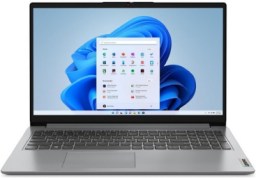
Buying guide for best laptops under $500
Laptops don’t have to be expensive to be worth your time. Sometimes it seems you need a $1,000 machine to do anything, but that simply isn’t true. Sure, prices fluctuate with the cost of chips and processors. But low-cost laptops don’t need to be a frustrating experience. You can get plenty of work done on a sub-$500 laptop.
Sub-$500 laptops definitely have tradeoffs. You won’t find 4K AMOLED displays on many laptops under $500. Nor should you expect the fastest processors either, although you can find a choice between Intel and AMD. And forget about discrete graphics cards: integrated graphics is your best bet. But if you’re shopping in this market, you already know you don’t need something flashy. You want a laptop that’s easy on the wallet and that lets you write emails, view presentations, surf the Web and run Office or Chrome.
We’ve tested several budget laptops over the years at the BestReviews Testing Labs. We’ve found some great values and good bargains with acceptable tradeoffs for the price. Our top pick, the Acer Aspire Go 15, is a fine everyday laptop for less than the price of an entry-level smartphone.
Key considerations
Operating system
One of the most important parts of any computer is the operating system. It acts as the bridge between your hardware and software and essentially tells the computer how to process information. Without an operating system, your machine basically becomes a box of wires without the tools to do anything.
The most common operating system you’ll find is Windows 10. Windows has a gigantic developer base and is a great choice for everything from high-end gaming to basic web browsing.
MacOS is also popular, even though it’s only compatible with Apple computers. Extremely user-friendly, it is a strong choice for photo, video, and music editing. However, it isn’t a great choice for gaming.
Chrome OS is designed solely for Chromebooks, and although it’s becoming more capable by the day, the operating system is more geared toward web browsing and apps. Finally, we have Linux. Although it uses fewer resources and hard drive space than Windows and is secure, the open-source system is not commonly found on laptops as factory equipment and requires some computing know-how to install.
Screen size
Screen size is a huge consideration for laptop shoppers, not only for convenience and luxury but also for weight and portability. Manufacturers measure screen size diagonally, and the majority of laptops fall between 12 inches and 17 inches.
Battery life
One of the key assets of a laptop is its portability, and if you’re away from power outlets for long periods, battery life is paramount. Battery life can vary greatly, though, with some having the juice to go for 9 to 12 hours and others only offering 4 to 6 hours. Consider your typical workload first — remembering that some applications use more battery power than others — and choose wisely.
Processor
The processor, CPU, or “brain” of your computer determines how quickly and efficiently it can run programs and execute commands. The faster the processor (typically measured in GHz), the more processes it can handle at once, which is significant if you plan to multitask often. Look for Intel Core and AMD FX processors if you’re interested in gaming and serious media editing. For simpler tasks, less-expensive CPUs like Intel Celeron and AMD F series are suitable.
Storage
Laptops generally have less storage than their desk-bound cousins, but they still offer plenty of room for your music, photos, games, and other files. Laptops will either use a hard disk drive (HDD), a solid state drive (SSD), or a mix of the two called a hybrid drive. SSDs use flash storage with no moving parts, meaning they work a bit faster than HDDs, but for now, they’re more expensive on average.
You can find products with 1TB of storage or more in a laptop, but if you’re left wanting more, you can use an external hard drive for added space.
Memory
Memory, often referred to as RAM (random access memory), is another factor in determining the speed and performance of your computer. In a nutshell, RAM is active memory for running programs, and there’s a wide range available, from 2GB to 16GB or more. A solid benchmark for laptops under $500 is 8GB, as that amount of memory will allow to you multitask relatively well, but more is always better if you can afford it.
Features
Touchscreen
Not all laptops feature the same design. Some options are actually a mix between a tablet and a laptop, meaning they equip a touchscreen. With machines like these, you can fold the laptop flat for tablet use or even spin the screen to help with presentations or collaborative projects. For added convenience, certain models include a stylus.
Ports
If you’re going to be connecting peripherals to your laptop — keyboards, mice, monitors, speakers, disk drives — pay attention to the number of ports your machine has. HDMI ports are useful for connecting your laptop to television to watch movies or stream shows, and USB ports are great for syncing mobile devices and transferring files. Keep in mind that USB-C and Thunderbolt ports may require adapters to connect to TVs or projectors.
Optical disk drives
These aren’t as common anymore due to external drives that connect through ports, but certain models still include them. If you have a mountain of DVDs you’d like to watch without buying additional equipment or fiddling with adapters, consider one of these.
Webcam
A webcam should be pretty low on your priority list, but if you use internet calling, conduct remote job interviews, or just want to record video with a much smaller file size, pick up a laptop with an included webcam and microphone. If your favorite machine doesn't have one, though, fear not: there are plenty of USB webcams on the market.
Price
Even though we’ve limited ourselves to $500 or less, there is more variance in budget laptops than you might think.
Inexpensive
The least you can expect to pay for a laptop is about $150, and at this price, you’re likely looking at a basic Chromebook.
Mid-range
Moving to the $300 range, you’ll see Chromebooks with more storage, increased memory, and larger screen sizes.
Expensive
Finally, at the top of our self-imposed range, you’ll find traditional Windows laptops with larger hard drives, faster processors, and limited gaming capabilities.
Tips
- Back up your files often. You can do with this with an external hard drive or with the cloud, but either way, you’ll be happy to have copies if something goes wrong.
- Keep it cool. Heat shortens the life of your laptop’s battery and hurts performance, so make sure your computer fan isn’t blocked by pillows, blankets, or other objects in your workspace. Consider using a cooling pad for more protection.
- Turn your laptop into a desktop by connecting it to an external monitor. Add other peripherals to create an efficient, ergonomic workspace.
FAQ
Q. Should I choose a Windows laptop or a Chromebook for everyday school and browsing?
A> It depends on the apps you need. Windows laptops like the Acer Aspire Go 15 AI Ready Laptop and Lenovo IdeaPad 1 are better if you rely on full desktop software, while the Samsung Chromebook Plus makes more sense for web-based work, Google apps, and simpler day-to-day use. Chromebooks usually feel more streamlined, but they can be limiting if you need traditional Windows programs.
Q. How much memory and storage should a budget laptop have?
A. For smooth everyday use, more RAM and enough local storage matter more than flashy extras. Models like the Acer Aspire Go 15 and Lenovo IdeaPad 1 are the kinds of laptops you should compare for memory and storage capacity, especially if you keep multiple browser tabs open or save files offline. If a laptop uses limited storage, you may end up depending more on cloud storage.
Q. Does screen size make a big difference in this price range?
A. Yes, because it affects both comfort and portability. A larger display like the Acer Aspire Go 15 AI Ready Laptop can be easier for schoolwork and split-screen multitasking, while a smaller system such as the HP Stream BrightView is easier to carry around. If you move between classes or workspaces often, weight and size may matter as much as resolution.
Q. Are touchscreen laptops worth paying attention to?
A. A touchscreen is useful if you like tapping through menus, handwriting notes, or using a laptop in tablet-like ways. The Samsung Chromebook Plus is a good example of a Chromebook with a touch-friendly design, while the Lenovo IdeaPad 1 is more about straightforward laptop use. The trade-off is that touch support can add convenience, but it does not replace having enough RAM or storage.
Q. What ports and connectivity features should I look for in a budget laptop?
A. Look for the ports you actually use, such as USB-A, USB-C, and possibly a headphone jack or microSD slot. The HP Stream BrightView Laptop is a compact budget laptop where you should check connectivity closely, while the Acer Aspire Go 15 is a better example of a larger system where you may want more room for peripherals. If you use external drives, printers, or wired accessories, ports can matter more than a slightly nicer finish.
Our expertise
Jmar Gambol is a writer and product tester for BestReviews. He has written almost 200 articles and buying guides, as well as tested products as varied as coffee presses, robot vacuums, laptops and smartphones.
Andrew Hard has written dozens of buying guides for BestReviews on everything from tech to travel. He loves helping shoppers find the best products and deals on the market.